How to Send Bulk WhatsApp Messages: A Complete Guide for Businesses

- What Does It Mean to Send Bulk WhatsApp Messages?
- 3 Ways to Send Bulk Messages on WhatsApp
- How to Send Bulk WhatsApp Messages: Step-by-Step
- WhatsApp Messaging Limits and Quality Rating
- How Much Does It Cost to Send Bulk WhatsApp Messages?
- 7 Bulk WhatsApp Campaign Ideas for eCommerce Brands
- Best Practices to Avoid Getting Banned
- Common Mistakes to Avoid
- Alternatives to Bulk WhatsApp Messaging
- How to Measure a Bulk WhatsApp Campaign
- How fastrr Broadcast and fastrr Assist Help D2C Brands Run WhatsApp Campaigns
- Conclusion
Your festive sale goes live at 8 pm. You have 40,000 past buyers, and most of them check WhatsApp far more often than email. So you open WhatsApp, select everyone and… you can’t. The app stops you, or worse, your number gets blocked halfway through.
That’s the problem this guide solves. If you want to send bulk WhatsApp messages for your online store, there is a right way and a risky way. The right way gets your offer to thousands of shoppers in minutes. The risky way can cost you the business number your customers know.
We’ll keep it simple. You’ll learn the three ways to send bulk messages, the exact setup steps, the rules Meta enforces, what it costs, how to avoid a ban, which alternatives exist, and how to measure what works. Every section is written for Indian D2C brands, but the basics apply everywhere.
What Does It Mean to Send Bulk WhatsApp Messages?
Sending bulk WhatsApp messages means sending one message, like a sale alert or an order update, to many customers at the same time. Each customer gets it as a private one-to-one chat from your business, not as a group message.
Think of it like a teacher sending the same note home with every student. Each parent reads it privately, and nobody sees who else got it. When a customer replies, only your business sees that reply.
Brands use bulk messages because WhatsApp is where Indian shoppers already spend their time. A message there feels personal and gets seen quickly, which makes it powerful for:
- Sale and new launch announcements
- Abandoned cart reminders
- Cash on delivery (COD) order confirmations
- Shipping and delivery updates
- Back-in-stock alerts and restock offers
- Review requests and repeat-purchase nudges
3 Ways to Send Bulk Messages on WhatsApp
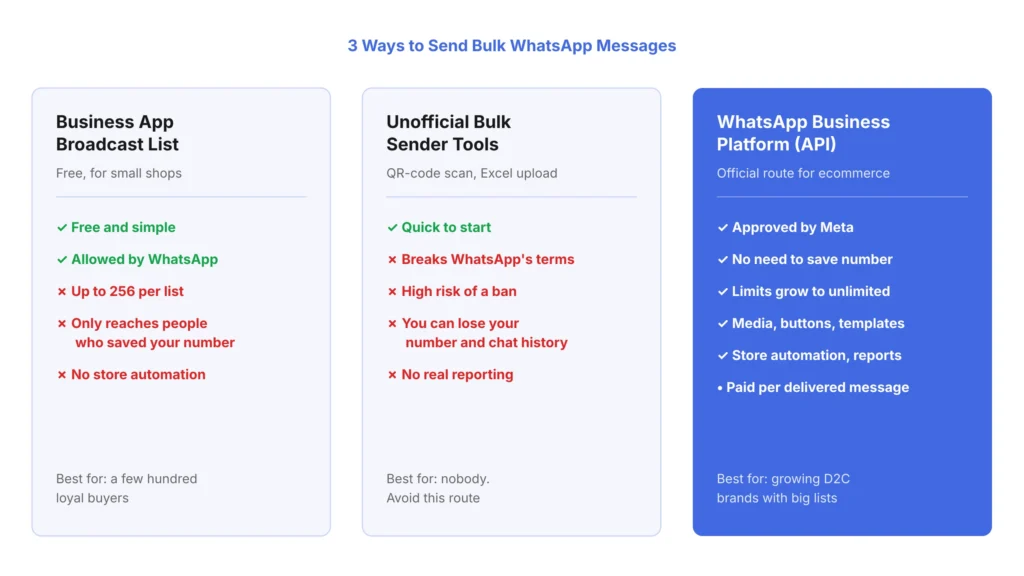
There are three common ways to send bulk WhatsApp messages. Only two follow WhatsApp’s rules, and only one works at real ecommerce scale.
1. Broadcast Lists in the WhatsApp Business App
The free WhatsApp Business app has a “Broadcast list” feature. You pick contacts, type a message and send it to everyone on the list at once.
It’s free and easy, but it has hard limits. Each list holds up to 256 contacts, and a customer gets your message only if they have saved your number in their phone. If 1,000 people are on your lists but only 400 saved your number, 600 never see the offer.
Broadcast lists suit a small shop with a few hundred loyal buyers. They don’t suit a growing D2C brand.
2. Unofficial Bulk Senders, Extensions and “Excel to WhatsApp” Tools
Many tools promise unlimited WhatsApp messages from an Excel sheet. Most of them ask you to scan a QR code, then they control WhatsApp Web or the app to send messages like a robot.
This is the risky route. These tools break WhatsApp’s terms, and when customers report or block your messages, WhatsApp can ban the number. You lose your chats, your customer history and the number people trust. A simple rule: if a tool needs you to scan a QR code to send bulk messages from your normal account, avoid it.
3. The WhatsApp Business Platform (API)
The WhatsApp Business Platform, often called the WhatsApp Business API, is Meta’s official system for businesses that message customers at scale. You usually access it through a Business Solution Provider (BSP) or a commerce platform built on top of it.
With the API, customers don’t need to save your number, there’s no 256-contact cap, and you can add images, videos, PDFs and buttons. You can also connect it to your store, so messages go out automatically when someone abandons a cart or places a COD order.
Here’s a quick comparison:
| Feature | Business app broadcast list | Unofficial bulk tools | WhatsApp Business API |
|---|---|---|---|
| Follows WhatsApp’s rules | Yes | No | Yes |
| Contacts per send | Up to 256 per list | Claims “unlimited” | Grows with your messaging limit |
| Customer must save your number | Yes | Varies | No |
| Ban risk | Low if used fairly | High | Low with opt-ins and good quality |
| Templates, buttons, media | Basic | Basic | Full support |
| Store automation and analytics | No | Limited | Yes |
| Cost | Free | Subscription | Per delivered message plus provider fee |
How to Send Bulk WhatsApp Messages: Step-by-Step
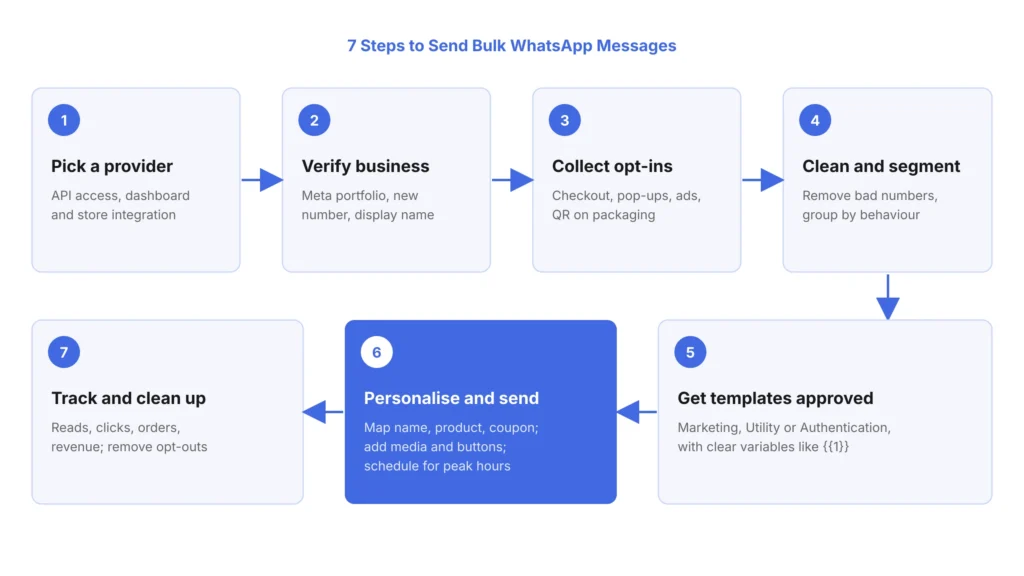
Here's how to send bulk WhatsApp messages the official way, from zero to your first campaign.
Step 1: Choose a WhatsApp Business API Provider
Pick a provider that gives you API access, a simple dashboard and integration with your store. For a Shopify or WooCommerce brand, check that it can pull customer and order data automatically, so you don’t upload spreadsheets every week.
Also check for segmentation, scheduling, a shared inbox for replies, and reports that show revenue, not just “messages sent”.
Step 2: Set Up and Verify Your Business
You’ll need a Meta Business portfolio, a phone number that isn’t already active on the WhatsApp app, a display name that matches your brand, and your business documents. Your provider guides you through it.
Business verification matters. According to Meta’s messaging limits documentation, verifying your business is one of the ways to move from the starting limit of 250 to 2,000 customers a day.
Step 3: Collect Opt-Ins the Right Way
An opt-in is a customer’s clear “yes, you can message me on WhatsApp”. WhatsApp’s Business Messaging Policy says you may message people only after they share their number and give opt-in permission, and you must respect every opt-out request.
Good places to collect opt-ins in an Indian store:
- An unticked “Send me updates on WhatsApp” checkbox at checkout or login
- A “Get offers on WhatsApp” pop-up or footer form
- A Click-to-WhatsApp ad, where the customer messages you first
- A QR code on your packaging or invoice
Keep a record of when and where each customer opted in. India’s Digital Personal Data Protection Act, 2023 also expects clear consent and an easy way to withdraw it, so a clean consent log protects you twice.
Step 4: Clean and Segment Your Contact List
Import customers from your store or a CSV file with numbers in international format, like +91 98XXXXXXXX. Remove duplicates, invalid numbers and anyone who opted out.
Then split the list into segments. A first-time buyer, a loyal customer and someone who abandoned a cart yesterday need different messages. Useful segments include repeat buyers, COD vs prepaid buyers, city or pin code, product category and last purchase date. Our guide to customer journey mapping helps you decide which message fits which stage.
Step 5: Create a Message Template and Get It Approved
Any message you start, outside a 24-hour window after the customer last wrote to you, must use a template that Meta has approved. A template is a fixed message with blanks, called variables, that fill in for each customer, like {{1}} for their name.
Meta sorts templates into three categories:
| Category | What it’s for | Example |
|---|---|---|
| Marketing | Offers, launches, sale alerts, win-back messages | “Hi Priya, our Diwali sale is live. Get 20% off on kurtas till Sunday.” |
| Utility | Updates about an order or account the customer started | “Your order #4521 has shipped and will reach you by Friday.” |
| Authentication | One-time passwords (OTPs) | “Your login code is 482913. Don’t share it with anyone.” |
Choose the right category. If you label a promotion as “Utility”, Meta can re-classify or reject it. Common reasons templates get rejected include wrong categories, spelling mistakes, unclear variables, and a variable placed at the very start or end of the message.
Step 6: Personalise, Schedule and Send
Upload or sync your segment, map each variable to a data field, such as name, product or coupon code, and preview a few real messages. Then schedule the campaign for when your buyers are active, often in the evening for many consumer brands.
Add a rich header like a product image or a short video, and use buttons. A “Shop now” link button and a “Stop promotions” quick-reply button both belong in a marketing message.
Step 7: Track Results and Clean Up
After sending, check delivered, read, clicked and replied counts, plus orders and revenue from the campaign. Then remove numbers that failed and anyone who opted out, and note which segment and time worked best.
WhatsApp Messaging Limits and Quality Rating
Even with the API, you can’t message unlimited people on day one. Meta sets a messaging limit: the number of unique customers you can start conversations with in a rolling 24-hour period. It applies across your whole business portfolio, so all your numbers share one limit.
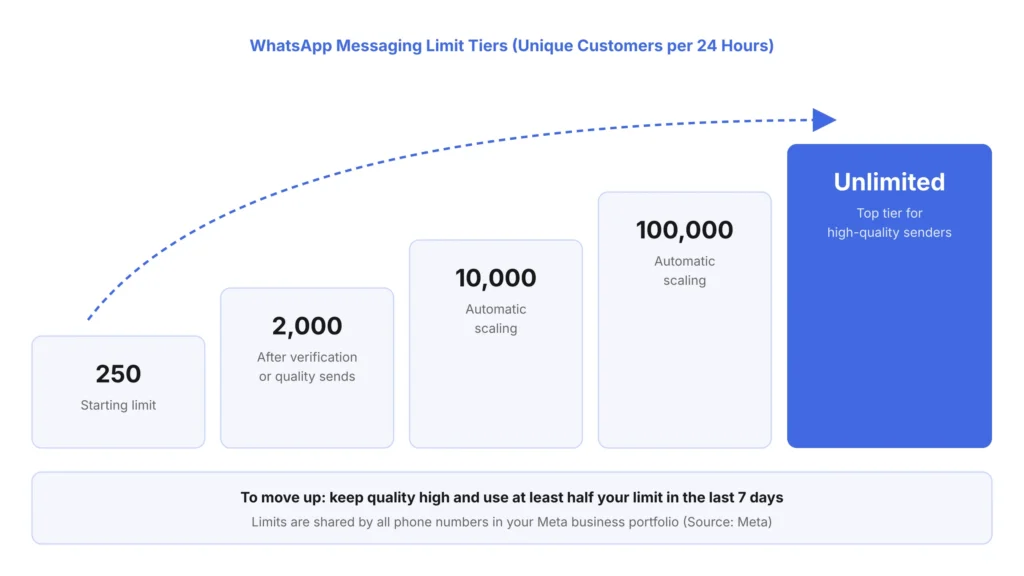
Per Meta’s documentation, the tiers are 250, 2,000, 10,000, 100,000 and unlimited. New portfolios start at 250. You can reach 2,000 by verifying your business or by sending enough high-quality messages. After that, Meta raises your limit automatically when your quality is high and you’ve used at least half your current limit in the last seven days.
Your quality rating decides how smoothly you grow. It’s based on how customers react to your messages, especially blocks and reports. It shows as green (high), yellow (medium) or red (low). If it drops, pause marketing sends, check which template or segment caused it, and fix it before you send more.
Practical rule: grow slowly. Send to your most engaged buyers first, then widen the list as your rating stays green.
How Much Does It Cost to Send Bulk WhatsApp Messages?
The WhatsApp Business app is free. The API is paid, and the cost has two parts: Meta’s message fee and your provider’s fee.
According to Meta’s pricing documentation, WhatsApp has charged per delivered template message since July 1, 2025. The price depends on the category, marketing, utility or authentication, and the customer’s country. India has its own rates, and marketing messages cost the most.
Key points to know in late 2026:
- You pay only for delivered messages, and customer messages to you are free.
- From October 1, 2026, Meta charges again for service replies and utility messages inside the customer service window, with 1,000 free service messages per phone number each month.
- Indian WhatsApp accounts must move to billing in rupees by December 31, 2026.
Rates change often, so check Meta’s current rate card and ask your provider for a per-message quote before planning a big campaign.
7 Bulk WhatsApp Campaign Ideas for eCommerce Brands
Knowing how to send is half the job. Here’s what to send, with a simple example for each.
- Abandoned cart reminder: “You left the blue sneakers in your cart. They’re still in stock, and here’s free shipping till midnight.” Read more about why shoppers abandon carts.
- COD order confirmation: Ask COD buyers to confirm with one tap before you ship. It cuts fake and impulse orders, a big disadvantage of cash on delivery.
- Prepaid nudge: Offer a small discount if a COD buyer switches to UPI. These tactics increase prepaid orders and reduce RTO.
- Sale and festive alerts: Diwali, End of Season Sale or a brand anniversary, sent a day early to loyal buyers.
- Back in stock: Message only those who asked to be notified.
- Post-purchase care: How-to-use tips, review requests and a reorder reminder when the product runs out. See our ideas for a better post-purchase experience.
- Win-back: A personal offer for customers who haven’t bought in 90 days.
Best Practices to Avoid Getting Banned
These habits keep your number safe and your quality rating green:
- Only message people who opted in. Never buy lists or scrape numbers.
- Make opting out easy. Add a “Stop promotions” button and honour it at once.
- Don’t over-send. One or two marketing messages a week is plenty for most brands.
- Be relevant. A message about baby products to someone who bought a phone case gets blocked.
- Keep it short and clear. Say who you are, what’s in it for them and one action to take.
- Respect timing. Avoid late-night and early-morning sends.
- Watch your quality rating daily during big sale weeks.
- Never share one customer’s chat details with another. WhatsApp’s policy forbids it.
Common Mistakes to Avoid
Most bans and poor results come from a few mistakes:
- Sending the same message to the entire list instead of segments.
- Mislabelling marketing messages as utility templates.
- Using plain “Hi” messages with no name, product or reason.
- Forgetting to test links, coupon codes and variables before sending.
- Measuring “messages sent” instead of orders and revenue.
Alternatives to Bulk WhatsApp Messaging
WhatsApp is strong, but it shouldn’t be your only channel. Here are other options and when to use them:
| Option | Best for | Watch out for |
|---|---|---|
| WhatsApp Channels | One-way updates to followers who join your channel | No personalisation, and you can’t target segments |
| WhatsApp Groups and Communities | Small, close-knit customer clubs | Members see each other, and groups get noisy fast |
| SMS | Customers without WhatsApp, OTPs, backup alerts | In India, senders need DLT registration under TRAI rules |
| Long content, newsletters, invoices | Lower open rates than chat apps | |
| RCS messaging | Rich, app-like messages in the default SMS inbox | Not every phone supports it yet |
| Push notifications | Shoppers who installed your app | Only reaches app users |
The smartest brands use these together. If a WhatsApp message isn’t delivered, an SMS or email can carry the same offer. Tracking every channel in one place, with the right ecommerce metrics, shows you what actually drives sales.
How to Measure a Bulk WhatsApp Campaign
Track these numbers for every campaign:
- Delivery rate: messages delivered divided by messages sent.
- Read rate: messages read divided by messages delivered.
- Click-through rate: button or link clicks divided by messages delivered.
- Conversion rate: orders divided by clicks.
- Revenue and ROAS: campaign revenue compared with what the campaign cost.
- Opt-out and block rate: a rising number is an early warning for your quality rating.
Compare segments, not just campaigns. You’ll often find that one segment, like repeat buyers in metro cities, drives most of the revenue.
How fastrr Broadcast and fastrr Assist Help D2C Brands Run WhatsApp Campaigns
fastrr by Shiprocket, from the team trusted by 4 lakh+ brands, brings bulk messaging and checkout data into one place. fastrr Broadcast lets you build personalised customer journeys across WhatsApp, email, SMS, push and RCS from a single platform, with end-to-end revenue attribution, so you see which message earned which order.
Pair it with fastrr Journey for automated triggers like abandoned cart reminders, and with fastrr Signals to segment shoppers by purchase behaviour, COD preference and RTO risk.
When shoppers click through and have questions, fastrr Assist offers AI shopping assistance with personalised recommendations and real-time multilingual support.
And because it all connects to fastrr Checkout, the shopper who taps “Shop now” lands on a one-click checkout with pre-filled addresses. Learn more in our introduction to fastrr by Shiprocket.
Conclusion
To send bulk WhatsApp messages that sell, skip the shortcuts. Use broadcast lists only for tiny audiences, avoid QR-code bulk senders, and move to the WhatsApp Business Platform once you’re past a few hundred customers.
Then follow the basics every time: collect clear opt-ins, segment your list, use approved templates, personalise, send at the right time and track revenue. Grow your messaging limit slowly, protect your quality rating, and keep SMS, email and RCS as backups. Do that, and WhatsApp becomes one of your most profitable sales channels.